
While using Gemini AI photo is quite easy, better results can be achieved by using special tips and techniques
Google Gemini has emerged as one of the preferred options for AI image generation. The tool is so easy that even a kid can use it to create fantastic images. However, there are also cases where one might need highly customized image generation. This will require you to understand a bit more about photography and the related jargon. Let us go through some useful tips and hacks that will allow you to create truly professional work using Gemini AI photo.
Secret watermark - All images created by Google AI photo carry a secret invisible digital watermark. This is done to ensure transparency and discourage attempts to showcase AI images as one's own creation. So, if someone shows you a photo and says they created it, you can easily check them using Google AI photo. You just have to upload the image on Gemini and ask - "was this generated through Google AI?"
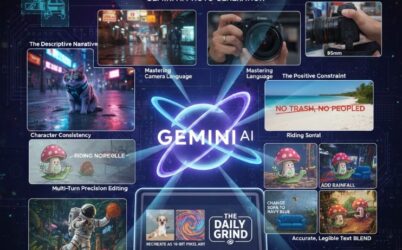
Choosing the right narration - Keywords are usually enough for Google AI photo. However, providing a more descriptive prompt can help the AI to better understand your specific needs. This is especially relevant when you want to focus on the details such as the camera angle, proper description of the object, colors, lights and shadows, special illuminations, etc.
Understand cinematic language - Your vocabulary may be good, but not many are aware of the specific terms used by professional photographers. Generative AI platforms like Google AI photo are well aware of these technicalities. For example, you can even tell Google AI photo to create an image based on what it would look like if captured by a specific lens. Similarly, you can ask to adjust according to lighting conditions that you want in your image.
Focus on what you want, instead of what you do not want - When working with Google AI photo, make sure you focus on the elements that you want in your image. Many people instead focus on telling AI things that they do not want in their photo. This approach may lead to unsatisfactory results. You should focus on describing the scene that you want in your image. The AI will take care of the rest.
Character consistency - If you want any special character or characters in your image, it is best to provide the description about them in the first conversation itself. This will help Gemini AI photo to maintain character consistency throughout the conversation. This can be even more useful when you are creating multiple images, using the same set of scenes and characters.
Precision editing - Similar to a human artist, multiple iterations may be needed before the desired results are achieved. This is true with Google AI photo as well and other generative AI platforms. If you need any small edits, just share the same with the Google AI photo. No need to recreate everything from scratch. You can make such changes with simple commands like - "shift the entrance room's door to the left", "remove the sofa from the room", "add a dog on the grass", etc.
Mix AI content and own uploads - When working with Google AI photo, you need not be limited with content generated by the AI. Because this can feel limiting in specific situations. For a more realistic feel to the AI generated images, you can add your own photos that you may have clicked or found on the internet. You can then further enhance the image using various styles and render options provided by the AI.
Say more with words - Google AI photo can come up with exciting text to go along with your photos. This can be quite useful when you are creating things like banners, infographics, posters, etc. You can experiment with various fonts and colors to get the desired results.
Concepts and abstracts - With Google AI photo, you can create images that go beyond the ordinary. For example, you can create abstracts that do not really focus on any realistic depictions of the world. Instead, these focus on ideas, emotions and intangible experiences, with various interpretations depending on the viewer.
Control aspect ratio - This can be useful in cases where you want your images to be in a specific size or resolution. For example, many sites have different requirements about the file size of the photo or document being uploaded. Similarly, controlling aspect ratio is also necessary when creating images for social media posts, websites and for printing purposes. You can easily control aspect ratio with Google AI photo.
.png)

